ChatGPT vs Gemini for AI Photos: Which One Keeps Your Face Same? (2026 Guide)
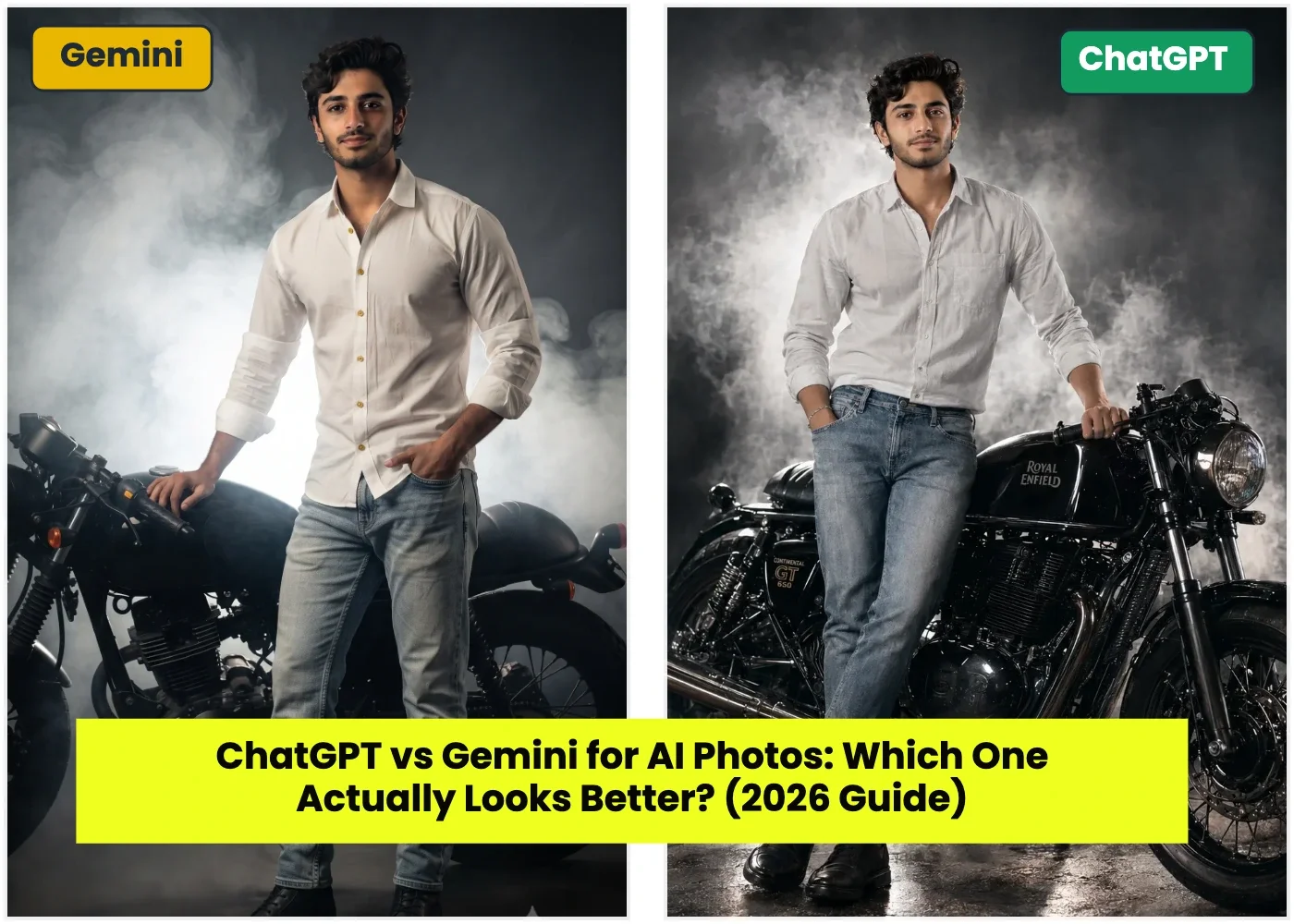
Quick Answer: After using both tools on real photo prompts, ChatGPT gives better results overall. Its colours are richer and more vibrant, while Gemini's photos often look flat and dull, almost washed out. The one place Gemini wins is complex poses it handles tricky body positions better than ChatGPT, which sometimes draws the head too big for the body. Read on for the full comparison and how to avoid ChatGPT's proportion mistake.
Most comparison articles on the internet are written by people who never actually used both tools on real photos. This one is different. Everything below comes from hands-on testing with the same kind of prompts you'll find on this site bridal, saree, gym, festival, and portrait shots.
Our Honest Verdict: ChatGPT vs Gemini
If you only remember one thing from this article, remember this:
ChatGPT wins on colour and overall look. Gemini wins only when the pose is complex.
Here is what we noticed in detail:
- Colours: ChatGPT photos have richer, punchier colours. Skin tones, outfit colours, and lighting all look more "alive." Gemini photos, in comparison, often come out flat and dull like the colour has been turned down a little. In simple words, Gemini photos look bland next to ChatGPT's output.
- Complex poses: If your prompt has a tricky pose sitting at an angle, hands doing something specific, body turned mid-action Gemini handles this better. ChatGPT sometimes struggles with these poses and can mess up the pose or the body position.
- Body proportion: This is ChatGPT's biggest weakness. Sometimes it draws the head noticeably bigger than the rest of the body, which makes the photo look odd, almost cartoonish. This mistake is more common in half-body or full-body shots than close-up portraits.
Quick Comparison Table
Simple takeaway: Use ChatGPT as your first choice for most prompts on this site. Switch to Gemini only when your prompt involves a complex or unusual pose.
Why Does ChatGPT Get the Head-Body Proportion Wrong?
This happens because ChatGPT is not editing your original photo pixel by pixel it is rebuilding the entire image from scratch based on your prompt. When a prompt asks for a full-body or half-body shot, the AI has to "guess" where each body part should go. Sometimes this guess is slightly off, and the head ends up too large compared to the shoulders and body.
This mistake happens less often in close-up, face-only prompts, and more often in full-body or dramatic-pose prompts.
Step-by-Step: How to Get Better Results and Avoid This Mistake
Step 1: Choose ChatGPT as your default tool. Start here for most prompts bridal, saree, gym, festival, attitude shots. The richer colours make a real difference in how "premium" the final photo looks.
Step 2: Add a proportion instruction to your prompt. Add this line at the end of your prompt: "Keep the body proportions natural and realistic head size should match the body correctly." This simple line reduces the chance of the oversized head mistake.
Step 3: Check the pose complexity before you start. If your prompt has a simple standing or sitting pose, go with ChatGPT. If your prompt has a complex, action-style, or unusual pose, switch to Gemini instead it handles these more reliably.
Step 4: Generate 2–3 times and compare. Both tools give a slightly different result every time you generate. If your first ChatGPT result has the head-too-big issue, simply regenerate often the second or third try fixes it.
Step 5: Zoom in and check the head-to-body ratio before saving. Before you download your final photo, zoom into the head and shoulders. If the head looks oversized compared to the body, regenerate rather than using that photo.
Which Tool Should You Use for Which Prompt?
- Bridal, saree, and portrait shots (simple pose) → ChatGPT. The colour and detail make these photos look premium.
- Festival and old money looks (standing or seated pose) → ChatGPT, since the richer colour palette suits these aesthetics well.
- Gym or attitude shots with dynamic, complex poses → Gemini, since it manages tricky body positions more accurately.
- Bike and outdoor action shots → Test both. If the pose is simple (standing next to the bike), ChatGPT works well. If it's a dynamic riding pose, try Gemini.
Browse ready-made prompts by category in our prompt library and apply the tips above when you generate.
Frequently Asked Questions
Which AI gives better photo colours, ChatGPT or Gemini?
ChatGPT generally produces richer, more vibrant colours. Gemini's output tends to look flatter and less saturated in comparison.
Why does ChatGPT make the head look big in my photo?
ChatGPT rebuilds the entire photo from your prompt instead of editing the original image. In full-body or half-body shots, it can misjudge the head-to-body ratio, making the head appear larger than it should. Adding a proportion instruction to your prompt and regenerating a few times usually fixes this.
Is Gemini better than ChatGPT for any type of photo?
Mostly Yes, Gemini tends to handle complex or unusual poses more reliably than ChatGPT. For simple poses, ChatGPT is usually the better choice overall.
Can I fix ChatGPT's proportion mistake without switching tools?
Yes. Add a line to your prompt asking the AI to keep body proportions natural, and regenerate the image 2–3 times. This significantly reduces the chance of an oversized head.
Should I always use ChatGPT instead of Gemini?
Not always. Use ChatGPT as your default for richer colours and overall quality, but switch to Gemini specifically when your prompt involves a complex or dynamic pose.